


Card key and smartphone key registration
If you register your IC card or smartphone as a key, you can unlock your bicycle by simply pressing the START button on the key and then holding it over the lock to start using the bicycle.
*You will need to register your IC card or your smart phone as a key at the control panel of the bicycle for the first time.
* Payment cannot be made with the IC card.
Usage fees are paid by credit card or d Payment. IC cards and smartphones can be used as keys to unlock the bicycles.
STEPCard key and smartphone key registration
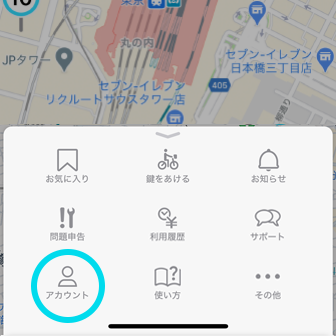
"Select ""Card Key/Smartphone Key Registration"" in the ""Account"".
After selecting the key type, you can register your card key or your smartphone in the following way."
■Square control panel
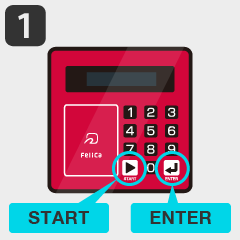
Press the "START" and "ENTER" buttons in sequence.
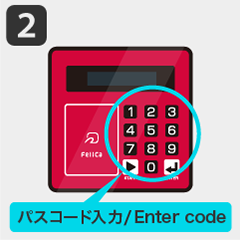
Enter the 8-digit passcode shown in the app.
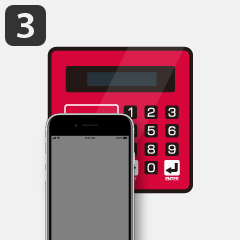
Hold an IC card or smartphone over the touch zone.
■Round control panel
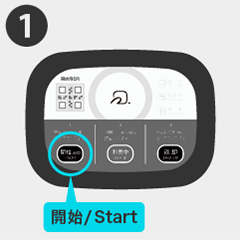
Press the "START" button.
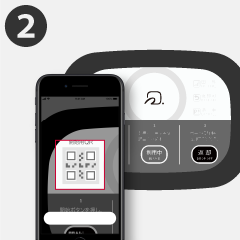
Follow the instructions on the app screen to scan the QR code.
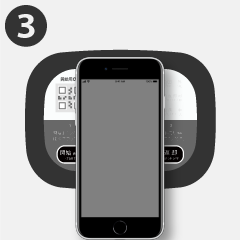
Hold an IC card or smartphone over the touch zone.
Card key and smartphone key registration is now complete. For more information on how to use the bicycles, please refer to the following page.